
PDFelement

- Updated
- Version 6.2.0
- Size 95 MB
- Requirements Android 7.0
- Developer Wondershare Technology
- Genre Productivity
- Google Play


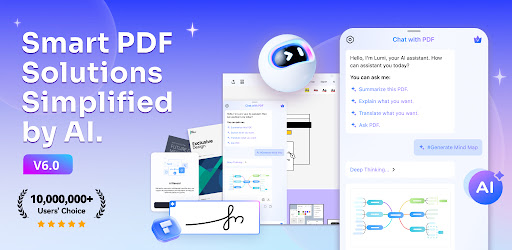
Working with PDF documents on a smartphone can be frustrating when you need to edit text, convert files, sign forms, or extract information from scanned pages. PDFelement Premium APK brings several document management tools together in one Android application, helping users handle everyday PDF tasks without relying on a desktop computer.
Developed by Wondershare, PDFelement is more than a traditional PDF reader. It combines PDF editing, document scanning, OCR, file conversion, digital signatures, and AI-powered tools in a single interface. Whether you are a student, office worker, or someone who regularly handles digital documents, the app offers a convenient way to manage PDFs on the go.
What Is PDFelement Premium APK?
PDFelement Premium APK is an all-in-one PDF editor and document management application for Android. It allows users to open PDF files, make changes, add annotations, scan paper documents, and convert files into other formats.
The application also includes AI tools that can help users understand lengthy documents, summarize important information, translate content, and improve written text.
Its combination of traditional PDF tools and AI-powered features makes it useful for both basic document reading and more advanced editing tasks.
Main Features of PDFelement Premium APK
1. Edit PDF Text and Images
One of PDFelement’s most useful features is its PDF editing capability. You can modify text and images directly inside supported PDF documents instead of recreating the entire file.
The editing tools help with correcting mistakes, adjusting text formatting, changing images, and making small document updates. Custom font support, including TTF and OTF fonts, can also help maintain document formatting.
2. AI Chat with PDF
Reading lengthy reports, research papers, or contracts can take considerable time. PDFelement includes an AI Chat with PDF feature that allows users to ask questions about the content of a document.
Instead of manually searching through every page, you can ask relevant questions and receive AI-generated responses based on the PDF.
This can be helpful when reviewing study materials, extracting information from reports, or understanding lengthy documents. Always verify important answers against the original file.
3. AI PDF Summarizer and Translator
The AI assistant offers additional tools for working with document content.
AI Summarizer: Extract important points from lengthy PDFs.
AI Translator: Translate PDF content and selected text into supported languages.
AI Rewrite: Improve grammar, spelling, and sentence clarity.
Mind Map Generator: Turn document information into a visual representation.
AI Record: Convert voice recordings into editable notes.
These tools can save time when working with large documents, although AI-generated results should be reviewed before professional use.
4. Scan Documents with OCR
PDFelement can turn physical paperwork into digital documents using its built-in scanner.
You can scan receipts, invoices, certificates, identification documents, books, and other printed materials using your phone’s camera.
Its OCR (Optical Character Recognition) technology can recognize text from scanned images and PDFs, making supported documents searchable and easier to edit.
The scanning tools also include image enhancement options such as perspective correction, deskewing, text sharpening, and background cleanup.
5. Convert PDF Files into Other Formats
Converting documents is another important part of the application. PDFelement supports PDF conversion to formats such as:
Microsoft Word
Excel spreadsheets
PowerPoint presentations
TXT documents
JPG and PNG images
Other supported document formats
It can also create PDF files from images and supported Office documents. This is useful when you need to share documents in a particular format or continue editing their contents elsewhere.
6. Merge, Split and Organize PDF Pages
Managing large PDF files becomes easier with the built-in page organization tools.
You can combine multiple PDFs into one document, extract selected pages, split files, rotate pages, rearrange their order, and remove unnecessary sections.
The compression feature can also reduce PDF file sizes, making documents more convenient to store or share.
7. Annotate, Fill and Sign Documents
PDFelement provides several tools for reviewing and completing PDF documents.
You can highlight important sentences, add comments, insert sticky notes, draw shapes, and mark up pages. The form-filling feature supports interactive fields, checkboxes, and radio buttons.
It also allows you to add digital or handwritten-style signatures and custom stamps to supported documents.
8. Read PDFs with Liquid Mode
The Liquid Mode reading experience adjusts document content to make it more comfortable to read on a mobile screen.
Other reading tools include bookmarks, text search, and Read Aloud. These options can be particularly helpful for students and people who regularly read lengthy PDFs on their phones.
9. Cloud Storage and File Sharing
PDFelement Cloud allows users to store and access supported documents across devices. The application also provides sharing options for sending PDFs through email, links, and supported social platforms.
Password protection is available for securing confidential PDF documents. However, users should still follow good security practices when handling sensitive files.
What’s Unlocked in PDFelement Premium App?
Wondershare offers a free version with limited functionality, alongside paid Premium plans and a separate AI Add-on.
According to the developer’s Google Play information, Premium members receive 100 complimentary uses for AI content features, such as Chat with PDF, and 10 uses for document AI features, including Summarize and Rewrite. The separate AI Add-on provides unlimited AI access under its applicable terms.
When looking for PDFelement Premium APK, users generally expect access to paid editing tools, additional document features, and fewer restrictions.
However, an unofficial modified APK cannot guarantee that every Premium or AI feature will work. Some functions depend on Wondershare’s online services, account verification, subscriptions, or usage credits. A modified installation does not automatically provide unlimited server-side AI access.
How to Install PDFelement Premium APK on Android
Follow these general steps if you are installing an APK manually:
Download the PDFelement APK from a source you trust.
Open your Android file manager.
Find and tap the downloaded APK file.
Allow installation from that source if Android requests permission.
Continue through the installation process.
Open PDFelement and explore its available PDF tools.
For better security and reliable updates, the official Google Play version is recommended. Be especially careful when handling APK files that request unnecessary permissions.
Is PDFelement Premium APK Worth Using?
PDFelement is a practical option for users who need more than a basic PDF viewer. Its combination of text editing, OCR scanning, conversion, page management, document signing, and AI assistance makes it suitable for different document-related tasks.
Students can use it to review study materials, professionals can manage reports and forms, and everyday users can scan paperwork or combine multiple PDF files.
Some advanced features require a paid plan or AI usage credits, so it is worth checking the available subscription options before upgrading.
Frequently Asked Questions
Is PDFelement free for Android?
Yes. PDFelement offers a free version with limited features. Additional functionality is available through Premium plans and an optional AI Add-on.
Can PDFelement edit PDF text?
Yes. The application provides tools for editing PDF text, images, fonts, and document layouts in supported files.
Does PDFelement support OCR?
Yes. Its OCR technology can recognize text from scanned documents and images, helping make supported files searchable and editable.
Can I convert PDF to Word or Excel?
Yes. PDFelement supports conversion to formats such as Word, Excel, PowerPoint, TXT, and several image formats.
Does PDFelement have AI features?
Yes. It includes AI Chat with PDF, summarization, translation, rewriting, mind map generation, and AI recording tools.
Is PDFelement Premium APK safe?
Safety depends on the APK’s source and whether its original code has been modified. Unofficial files may contain unwanted code or security risks. The official Modded version is generally the safer option.
Who developed PDFelement MOD APK?
PDFelement is developed by Wondershare Technology, a company known for document management and productivity software.
A Smarter Way to Handle Everyday PDF Tasks
PDFelement combines several useful document tools in one Android application. From editing text and scanning paperwork to converting files and using AI to understand lengthy PDFs, it provides a flexible solution for managing documents on a smartphone.
If you are exploring PDFelement Premium MOD APK, remember that official Premium benefits and unofficial modified versions are not necessarily the same. Check feature availability carefully and choose a trustworthy installation source before using the application for important documents.